Another requirement, now customer need to disable default windows Print Screen function on all of their user desktop,
So, we started our searching again, and easily we able to find out how to disable print screen on windows by importing following registry.
[HKEY_LOCAL_MACHINESYSTEMCurrentControlSetControlKeyboard Layout]
"Scancode Map"=hex:00,00,00,00,00,00,00,00,03,00,00,00,00,00,37,e0,00,00,54,00,
00,00,00,00
So, again we start working to create a custom adm file. As because this is a HKLM key, so we need Privilege to import it into registry, and only way to do so is to apply some policy via Computer Configuration, whit which we can force policy on each computer not on individual user.
But suddenly we discover that ADM files don’t support reg_binary values, so we have to find out any other alternatives.
Now we have to create tow .VBS file, one for to disable print screen and another for to re-enable print screen,
VBS Script for disable print screen,
'Disable Print Screen Function
const HKEY_LOCAL_MACHINE = &H80000002
strKeyPath = "SYSTEMControlSet001ControlKeyboard Layout"
strComputer = "."
BinaryValueName = "Scancode Map"
iValues = Array(&H00,&H00,&H00,&H00,&H00,&H00,&H00,&H00,&H03,&H00,&H00,&H00,&H00,&H00,&H37,&He0,&H00,&H00,&H54,&H00,&H00,&H00,&H00,&H00)
Set oReg=GetObject("winmgmts:{impersonationLevel=impersonate}!\" & strComputer & "rootdefault:StdRegProv")
disablePS = oReg.SetBinaryValue(HKEY_LOCAL_MACHINE,strKeyPath,BinaryValueName,iValues)
VBS Script for re-enable print screen
'Re-Enable Print Screen Function
const HKEY_LOCAL_MACHINE = &H80000002
strKeyPath = "SYSTEMControlSet001ControlKeyboard Layout"
strComputer = "."
strStringValueName = "Scancode Map"
set objReg = GetObject("winmgmts:\" & strComputer & "rootdefault:StdRegProv")
enablePS = objReg.DeleteValue(HKEY_LOCAL_MACHINE,strKeyPath,strStringValueName)
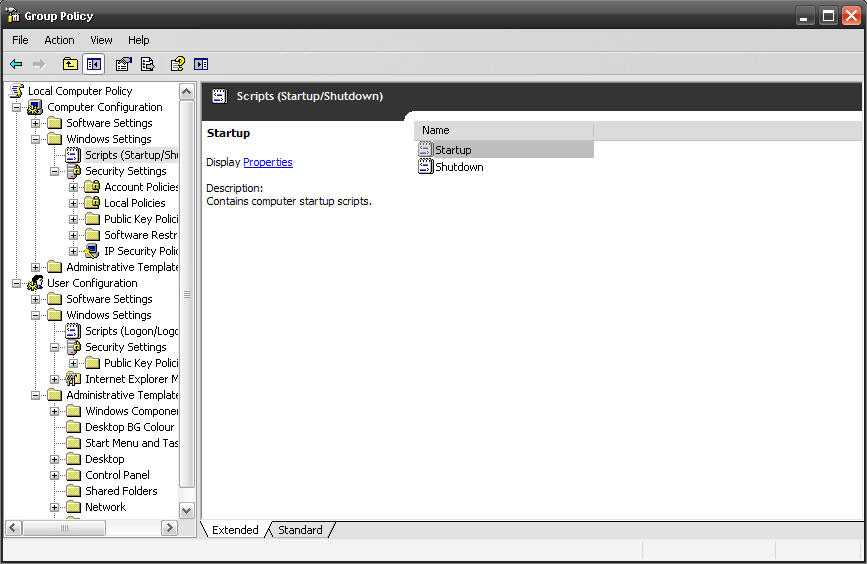
Now we can easily implement above two script via GPO by using system Startup/Shutdown script.
Thanks.. 🙂
 Licensed under CC BY-ND 4.0 International
Setup your own Monitoring – Disk Space Utilization Monitoring tool for free
It is always recommended to keep tracking of the disk space utilization…

Port Scanner using PowerShell with Email Notification
Few days back I was asked to create a script, which will…
Set File System Auditing via PowerShell
For last few days, I was trying to figure out how to…

AWS EBS Snapshots Automation (Disaster Recovery) from Windows PowerShell
It is always a good idea to reduce hardware dependencies by moving…
I really liked this post. Can I copy it to my blog?
Thanks in advance.
Sincerely, Timur.
Yes, but you must add this site link on your post as source..
🙂
Hi ,
Thanks for the info but sad to know Reg_binary is not supported by ADM
Thanks
But still u can use above script for the same..
good work
I am sorry but somehow it does not seem to work.
Even when applied directly in XP. The registry is changed. but after pressing the printscreen button, I can still paste the screen captured result in word or painter.
What am I missing here?
Did you restart your system after executing the script?
if still it’s not working, can u upload ur script(in zip/txt format) to rapidsahre or somewhere else so i can re-check the script..
You are right! When appied directly to XP desktop, it works perfectly after logout and login.
Now I really want it to work also when users login to my server(using Remote Desktop Connection).
I followed exactly the steps above. Added the DPrintScreen.vbs in my windows 2000 server GPO’s Computer Startup script and the User login script. Then restarted the server.
But the problem is that it will still allow the user to printscreen. Any ideas? Thanks for your kind help.
This script required admin rights to modify registry settings, So, if u put it as user logon script, it will not work, u have to set it as computer logon script, so it can execute with system account privilege.
Check the screen shot, i have applied it on Computer Configuration startup script.
Hope this will solve your problem.
Thanks
Saugata 🙂
Yes! I have applied DPrintScreen.vbs on GPO’s Computer Configuration Startup Script as well.
Also given the user administrators previlege.
But when the user login using Remote Desktop Connection, he can still print screen.
*.vbs file not working some xp systems.
Did you execute this script with admin privilege?
Just found this; the .vbs errors out on the second line of either, i.e. the declaration of the constant.
For script to run without error replace & with &
replace “& amp ;” with &
Script Updated!
Yes. It worked. We were using this for a training room so candidates could not copy screens to cheat on their tests. Thanks!!
It worked perfekt, but only with administrative accounts. When i tay to use GPO with logon scripts, the restricted users can not execute the script. The script change registry value, so onli administrator are able touse it and the machine must be restarted.
Does somebody have any aidea, how the script are able to be executed by the restricted users ?
You can do it, try to set computer policy, it will use System Account, which will have administrator privilage.
Great blog here! Also your site loads up fast! What host are you using?
Can I get your affiliate link to your host?
I wish my website loaded up as quickly as yours lol
This is my first time visit at here and i am genuinely pleassant to read
all at one place.
will it works on windows 10 ? anyone tested it ?
Technically it should be working, why don’t you give it a try and let everyone know. I will update the post accordingly.
Regards,
Saugata D.
Hi : I have a requirement where the user would be logging in from personal device to his office desktop via remote desktop connection and then connect to client VDI. How to disable the print screen in RDC. Does the same solution work ?
As long as it is Windows system, this will work for sure. 🙂
Do let me know how it works after your implementation.
can i send to you the script I saved from yours and see what is wrong as I am getting line 7 char 1 error after replacing & to & in disable ps.
Replace “& amp ;” with &
I am trying this script on windows 2016 server, getting line2 ,char 28 compilation error,after replaced “& amp ;” with & also same error. Kindly suggest.
Gostei da postagem!
Tem o script correto?
Até Obrigado
Could you please let me know in English?