Again, as per business requirement, we are looking for some free internal (LAN) chat solution. There are some free LAN chat tools available but most of them are failed to detect multiple VLAN, only working fine in single VLAN.
But we need something which can be implemented on more than 50 branches across India. So we are looking for a free chat server. There are some chat servers available, but none of them support Active Directory (LDAP) authentication.
Suddenly we found a solution, actually it’s not a single solution, it a combine solution of PHPBB3 and AJAX Chat.
Requirements:
-
PHPBB3 with LDAP Authentication
For PHP and MySql with Apache web Server you can use Wamp Server.
Instalation:
You have to install PHPBB3 first, for PHPBB3 installation help click here.
Now you have to set Active Directory authentication for PHPBB3. For that first you have to enable LDAP extension on php and you have to create a user id in active directory with password never expire enabled. Then you have to create the same id in PHPBB3, if you decided to use displayName as all users ID then you have create that ID same as displayName or else you can use sAMAccountName as all users logon id, for that case you have to create that ID same as sAMAccountName.
For e.g., you create the ID as PHPBB User and its logon id is phpuse, in this case displayName = PHPBB User and sAMAccountName = phpuse.*
After that you have to give founder permission on PHPBB3 on that ID, and logon with that ID in phpbb, then goto ACP>General>Authentication, Select an authentication method as LDAP and use following as per your domain.
LDAP server name: Your Active Directory Server IP
LDAP server port: Port will be default
LDAP base dn: DC=donainname,DC=com
LDAP uid: displayName or sAMAccountName *
LDAP user filter: ObjectClass=person
LDAP e-mail attribute: mail **
LDAP user dn: cn=username,ou=ou name,dc=domain,dc=com
LDAP password: Password of above user id.
If you specify everything properly, then you will get following screen.

Note:
*If you set displayName in LDAP uid, then user id will be their domain Display Name, and if you set sAMAccountName then user id will be domain logon id.
**We have Exchange Server in our network so for that we use mail as e-mail attribute.
Now you have to install AJAX Chat on PHPBB3, download AJAX Chat from bellow link, and extract it into PHPBB3 install directory and execute following path.
http://example.org/phpBB3/chat/install.php
For further details, read supplied readme.txt
Download(with Small modification):
 chat.zip (457.3 KiB, 1,080 hits)
All Done,
[ad#av_post]
Now go to http://example.org/phpBB3/chat and logon with any domain user id and password.
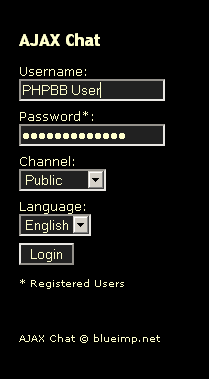
After login u can easily chat with others…
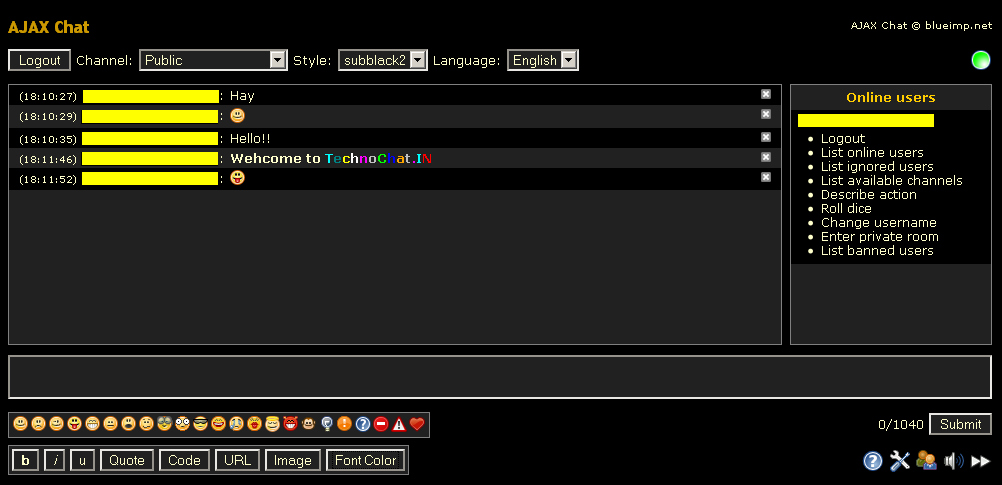
I think this is the easiest way to install chat server on your organization for free…
[ad#av_post]
 Licensed under CC BY-ND 4.0 International
Set File System Auditing via PowerShell
For last few days, I was trying to figure out how to…

Ditching PsExec – Running Interactive SYSTEM Shells Natively in PowerShell
If you’ve spent any time in Windows System Administration over the last…

From The Blinking Cursor to The Thinking Machine: A Memoir of Automation
There is a specific kind of silence that only exists in a…

The Ultimate Command Center for AdGuard Home Power Users
The Problem: "Friction & Context Switching" Whether you run a single AdGuard…
Hi, thanks for posting this article. Do you know where I can find more information on this. Thanks
what kind of info u need?
Hi, Was able to setup a server within about 45 mins… quite neat… Just wanted to know which e-mail client (NO BROWSER) can be used with this
Tx in advance
Hi, Nice article… got it up and running in about 45 mins.. Do you have any chat client (NOT BROWSER) that would work with this setup… Tx in advance
Hi there! Very useful post! I am very glad that I was able to stumble upon your blog while searching Yahoo. Koodles for this great post!
It is actually a nice and helpful piece of information. I am happy that you simply shared this helpful information with us. Please stay us informed like this. Thank you for sharing. bgdaafekegga